Private beta
Navato for Android
Turn-by-turn navigation that keeps going in tunnels, underground car parks and other places where GPS drops out, with the full map on your phone.
Checking Navato’s servers…
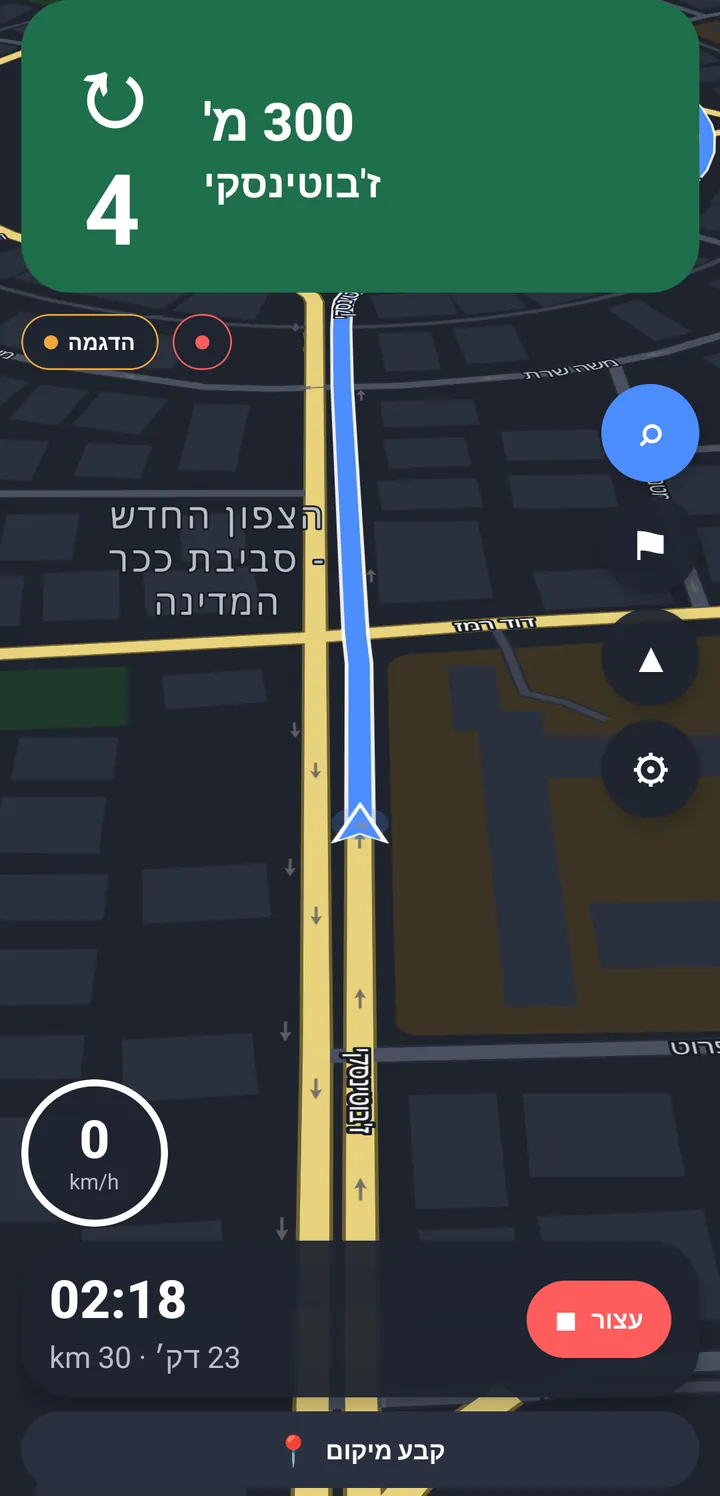
How it works
Join the beta
Leave your email below. When there’s a place for you, we’ll write and help you get started.
Choose a destination
Search an address in the offline map on your phone.
Drive
Navato keeps you on course, even with no sky above you.
What you need
- Android 7.0 or later
- Navato is for Android only during the beta.
- A place in the beta
- Navato is in private beta. When there’s a place for you, we’ll write and go through everything you need with you, one to one.
- Free space for the offline map
- The map comes inside the app, so the download is large, and the app copies the map into its own storage the first time it opens. Keep about 1 GB free.
Permissions, and why Navato asks for them
- Bluetooth (nearby devices)
- To connect to nearby devices you choose to use with Navato.
- Location
- Older Android versions need it to find nearby devices you choose to use with Navato, and Navato can use GPS as a backup when it’s reliable. It’s used only while Navato is navigating or tracking a drive in the foreground, with its notification showing. There is no background location permission.
- Notifications
- To show the navigation status while the screen is off.
- Internet
- Only for updates, the sharing you turn on, and live location reporting if you switch it on. Never needed to navigate.
- Files (Android 9 and older)
- To save drive recordings to your Downloads folder when you ask.
Navigation never needs the internet
The map, routing and voice guidance all run on your phone, and the app goes online while you navigate only if you switch on live location reporting. When you’re parked and online, it checks for settings and announcements, downloads community updates unless you turn them off, and shares only what you chose to share.
Sharing is optional, and off until you turn it on
In the app, go to Settings › Data & privacy. Each switch is separate, and you can turn any of them off at any time.
What we never collect
- Your name, email or phone number. The app has no accounts.
- Your vehicle’s VIN, or identifiers of other devices you use with the app.
- The first and last stretch of a shared trip, where it starts and ends.
- Contacts, photos or data from other apps.
- Your IP address. Only a one-way daily code to stop abuse, deleted after two days.
How Navato learns
Every shared trip summary is analysed on our servers. When enabled, Claude by Anthropic, in the United States, also reviews the summary. Claude receives only a version of the trip summary with no coordinates or dates, never recordings, device codes or IP addresses. Road knowledge enters the shared map only when several different phones support it.
Read more in the privacy policyCommunity updates
With Use community knowledge on, Navato downloads a pack of road knowledge when you’re online and parked. The download is the same for everyone and tells us nothing about who or where you are. You don’t need to share anything to receive it, and you can turn it off in Data & privacy.
You stay in control
- Change what you share at any time in Settings › Data & privacy.
- Turning a switch off stops future uploads and deletes what was shared under it.
- Delete my data on the server removes everything this phone has shared.
- Export my data saves a copy of everything linked to your phone.
Security
Found a vulnerability? Write to security@navato.ai (see our security.txt). Please give us 90 days before you disclose it.
Questions from drivers
Something else? Write to hello@navato.ai.
Does Navato need an internet connection?
No. The map, address search and routing all live on your phone, and Navato goes online while it’s guiding you only if you switch on live location reporting. When you’re parked and online, it checks for app settings and announcements, downloads community updates unless you turn them off, and uploads only what you chose to share.
What do I need to use Navato?
An Android phone with version 7.0 or later and about 1 GB of free space for the map. When there’s a place for you in the beta, we’ll go through everything you need with you, one to one.
Is it safe to use while driving?
Use Navato like any navigation app: in a phone holder, with the destination set before you drive. Directions are spoken so you can keep your eyes on the road. Always follow road signs and the law, even when Navato says otherwise.
What does Navato learn from my drives?
Nothing, unless you turn sharing on. If you do, your phone trims each drive and sends a compact summary. Our servers combine summaries from many phones into knowledge about roads, such as where GPS is unreliable or how long a junction usually takes, and share it with everyone. Read how we protect it.
Is there an iPhone version?
Not yet. During the beta, Navato is for Android only.
How much does it cost?
The beta is free.
Join the beta
We’re opening Navato to a small group of Android drivers. Leave your email and we’ll write when there’s a place for you.
- Early access to the Android app
- A direct line to the people building it
- Beta news only. No newsletters.
Representing an organisation? Request a pilot.
You’re on the list.
We’ll write to you when there’s a place in the beta.